Altinn documentation
people found this article helpful
Changes required to update the Altinn integration
Related to the OCS HR 29.00 version released in November 2024.
Background
In 2025, Altinn will deprecate its existing SOAP integration, which Mintra has updated by implementing the new version via the Integration Platform. This updated integration is more secure and resilient than previous in-app integrations, as it is built using modern, secure architecture. The Integration Platform is hosted on AWS in Ireland, and customers using the Altinn integration must ensure that their OCS HR system can communicate with this platform. In some cases, URL whitelisting may be required to enable this communication. It’s recommended to test access to the Integration Platform before upgrading OCS to version 29, as all traffic between OCS HR and the Integration Platform is encrypted and transmitted over port 443. Note that IP addresses for the platform are not static, so traffic filtering should utilize firewalls or proxy servers capable of URL filtering.
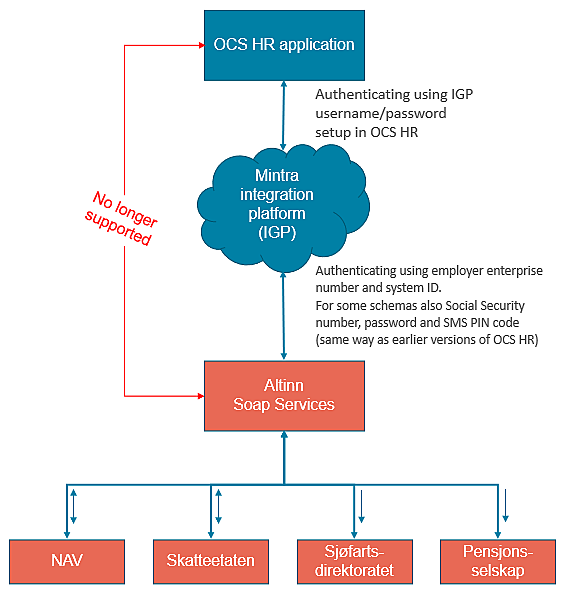
Steps to upgrade for Altinn Integration
1. Network Testing
Confirm that both the OCS Service and OCS HR have network access to the Integration Platform. If access issues arise, contact your IT department to make the necessary network changes.
2. Software Update
Upgrade OCS HR and OCS Service to the latest versions compatible with the new integration.
3. Configuration Updates
Make the required configuration adjustments in OCS HR, as detailed below.
URL Whitelisting and Testing
Ensure that OCS HR and OCS Service have outbound access to the URLs listed below.
This access can be tested directly on the servers by visiting each Test URL in a browser:
| URL | TEST URL | TEST RESULT |
| https://identity.mintragroup.com | https://identity.mintragroup.com/.well-known/openid-configuration | JSON document |
| https://igp.mintragroup.com | https://igp.mintragroup.com/ | "Welcome to Integration Platform Services" webpage |
| https://workflow.mintragroup.com/ | https://workflow.mintragroup.com/healthz | Healthy |
Note: These URLs do not have static IPs, they must be whitelisted based on the URLs.
System setup - Webservice
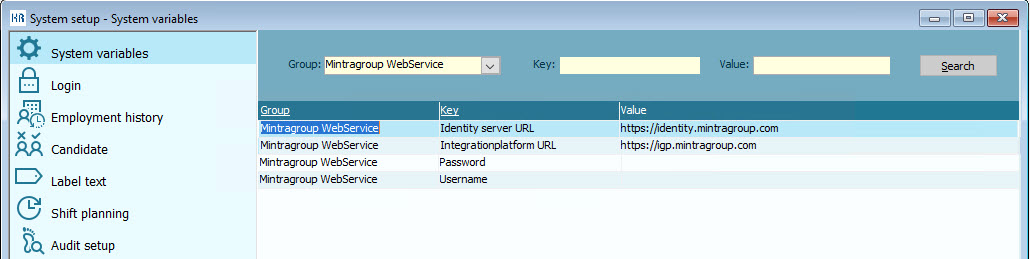
In your system, navigate to Settings > System Setup and complete the following:
1. Mintragroup WebService Configuration:
Under Group: Mintragroup WebService, set the following keys:
- Identity server URL (https://identity.mintragroup.com)
- Integrationplatform URL (https://igp.mintragroup.com)
2. IGP Authentication:
You will need a username and password for the Integration Platform (IGP). Contact Mintra support to request these credentials.