Trainingportal Single Sign On (SSO)
people found this article helpful
What is Single Sign On?
Trainingportal supports Single Sign On for a secure and convenient way for your users to access the system.
This allows your users to authenticate with Trainingportal using their company login credentials, so there is no need to remember a different username and password for the system.
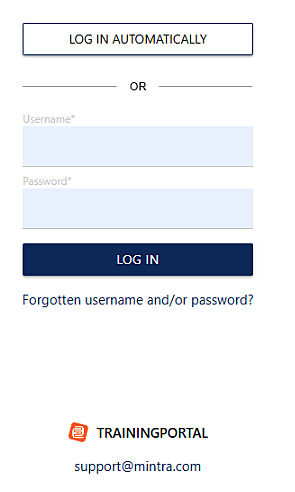
Once enabled, the login screen will present a "Log in Automatically" button which will initiate the SSO login.
Setup Requirements
To activate SSO on your portal, we require:
- A URL to your (IDP) federation metadata. This must be an URL, not a file.
- Users in Trainingportal must have their External ID populated with the value that will be sent from your Entra / Active Directory system as the NameID
Configurations for your Entra / Active Directory system:
- Trainingportal metadata: https://www.trainingportal.no/mintra/saml/metadata
- ACS URL: https://www.trainingportal.no/mintra/saml/SSO
- Trainingportal (Service Provider) Entity Id: prod.trainingportal.no
- SP initiated login URL (recommended and easiest): https://www.trainingportal.no/mintra/samlsso/[thePortalId]
- Custom Claim attribute: portalId = ***
Mintra can assist with providing you your portal ID so this can be added to your configuration.
If you would like to activate SSO for your portal, please send the relevant information to our support team at support@mintra.com.